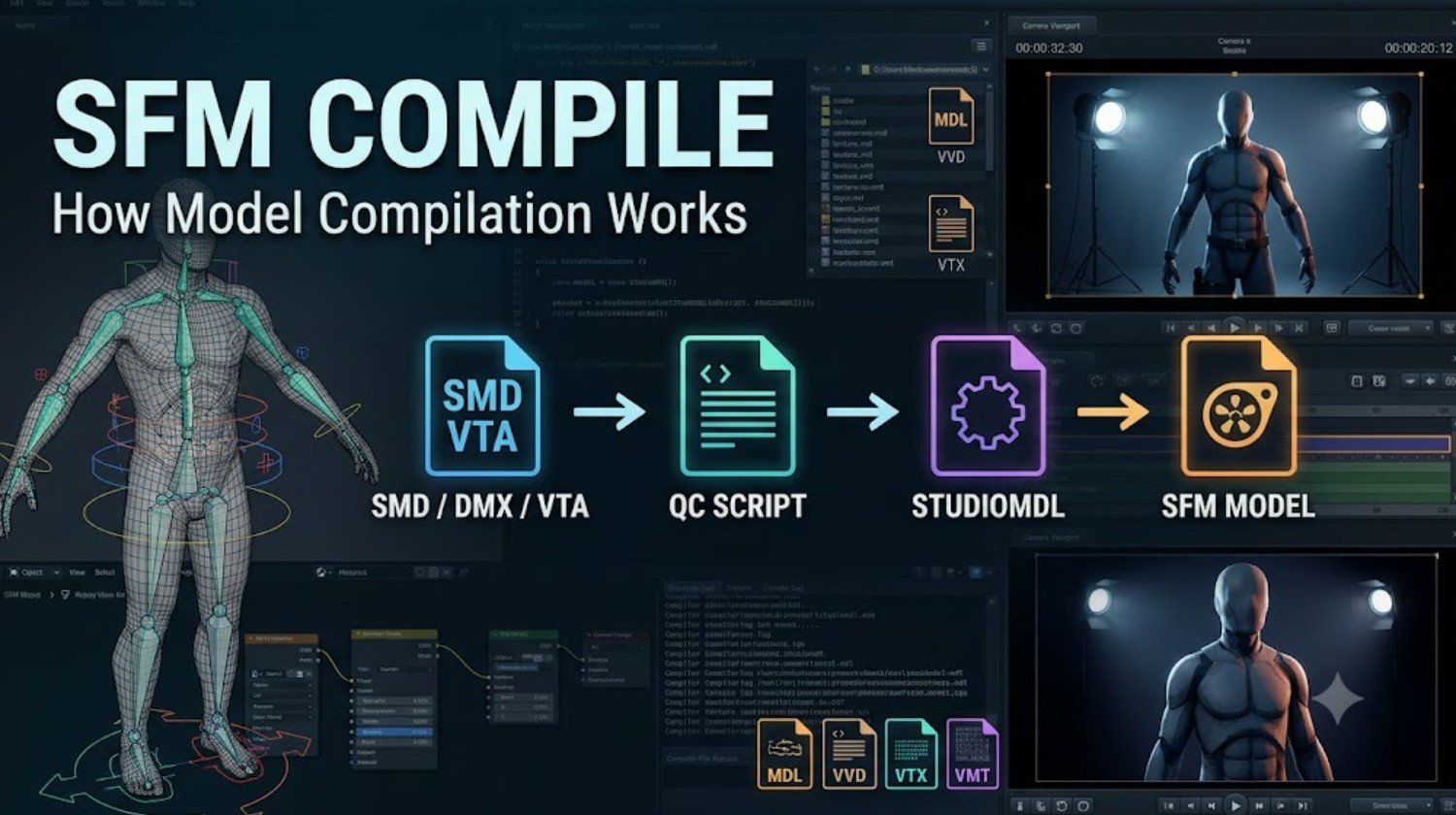
Source Filmmaker gives creators a practical way to build animated scenes using characters, props, maps, cameras, lighting, particles, and sound. However, a model created in Blender, Maya, or another 3D application cannot usually be dropped directly into an SFM project. It first has to be converted into files the Source engine can recognise.
That conversion process is commonly called SFM compile. It packages model geometry, bones, animation sequences, collision data, and material paths into an engine-ready format. Although the workflow can look complicated at first, it becomes much easier once you understand the role of each file and tool.
What Does SFM Compile Mean?
SFM compile is a community term for converting editable or intermediate model files into compiled Source engine assets. In most cases, it refers to model compilation. A creator prepares a mesh and skeleton in a 3D program, exports the necessary source files, writes a QC script, and processes everything through Valve’s StudioMDL compiler.
Compilation is different from rendering. Compiling prepares assets so they can be loaded inside Source Filmmaker. Rendering happens later, when an animator exports the finished scene as a video, still image, or image sequence. A model can be compiled correctly without ever being rendered, while an SFM project cannot use an uncompiled custom model in the normal Source 1 workflow.
A compiled model is rarely just one file. The main MDL file works alongside other files that store vertex data, optimised mesh information, collision details, and animations. If one of these companion files is missing, the model may fail to load or appear as an error object.
The purpose of compilation is therefore not simply to change a file extension. It organises different types of model data into a structure the Source engine can process efficiently. This is why correct paths, compatible exports, and a valid QC script matter so much.
Files and Tools Used in SFM Compilation
The most common source files used in an SFM compile workflow are SMD, DMX, and VTA. SMD files can contain model geometry, skeleton data, vertex weights, or animation sequences. DMX is a more flexible Valve format that can store advanced model and animation information. VTA files are often used for vertex animation and facial flex data.
A model project may contain several separate exports. For example, one file may hold the reference mesh, another may contain an idle animation, and a third may define collision geometry. The compiler combines these files according to the instructions written in the QC script.
The QC file is a plain-text configuration script. It tells the compiler where the finished model should be placed, which mesh should be used, where materials are stored, what animations are available, and whether the asset includes collision, bodygroups, skins, attachments, or facial controls. Common commands include $modelname, $body, $cdmaterials, $sequence, and $collisionmodel.
Valve’s model compilation documentation provides useful background on how source files, QC scripts, and StudioMDL work together. It is a valuable reference when a command produces unexpected results or when a more advanced model feature needs to be added.
StudioMDL is Valve’s command-line model compiler. Many creators access it through Crowbar, a third-party graphical utility that makes it easier to choose the QC file, select the correct game path, run the compiler, and inspect the output log. Crowbar does not replace StudioMDL; it provides a more convenient interface for it.
Blender users often rely on Blender Source Tools to export SMD, DMX, and related data. The add-on helps prepare Source-compatible files, but the model still needs to go through the compilation stage before it can be used in SFM.
How the SFM Compile Process Works
The workflow begins inside a 3D application. The creator checks the model’s scale, orientation, UV layout, material names, skeleton, bone weights, and animation frames. Applying transforms and using consistent bone names at this stage can prevent many problems later.
The model is then exported into one or more Source-compatible files. A basic prop might need only a reference mesh and optional collision model. An animated character may require a reference mesh, skeleton, several animation sequences, facial data, and articulated physics information.
Next, the creator writes a QC file. A simple script might define the finished model path, reference mesh, material folder, surface type, idle animation, and collision model. The paths written in the QC must match the folders that will eventually be used inside Source Filmmaker.
After the QC file is ready, it is processed through StudioMDL or Crowbar. The compiler reads the script, finds the required source files, and creates the final Source model package. The output may include MDL, VVD, VTX, PHY, and ANI files.
These compiled files normally belong inside the models directory of an SFM content folder, such as usermod. Material files are stored separately under the materials directory. A VMT file defines the material and shader, while a VTF file contains the texture image data.
Once the files are in the correct locations, the model should be tested inside Source Filmmaker. The creator should inspect its scale, materials, bones, animations, collision, attachments, and facial controls. A successful compiler message does not automatically prove that every part of the model works correctly.
Common SFM Compilation Errors
One of the most frequent problems is a pink-and-black texture. This usually means SFM cannot find the correct material or texture. The cause may be a missing VMT file, missing VTF file, incorrect $cdmaterials path, wrong $basetexture reference, or mismatched material name.
Another common issue is an error model or invisible asset. This may happen when the MDL file is present but its VVD or VTX companion files are missing. It can also occur when the model was compiled for an incompatible Source branch or installed in a folder that does not match the $modelname path.
A gameinfo.txt error generally means StudioMDL is using the wrong game directory. The compiler must be pointed towards a valid Source Filmmaker content setup. Incorrect game paths can stop compilation or produce files for the wrong engine configuration.
Scale and rotation problems usually begin before compilation. Unapplied Blender transforms, incorrect export units, root-bone orientation, or conflicting QC scale settings can make the model appear too large, too small, sideways, or underground.
Animation errors often result from skeleton inconsistencies. The reference mesh and animation exports must use the same bone hierarchy and naming structure. Missing root bones, altered bone names, incorrect frame ranges, or invalid $sequence entries can stop animations from playing correctly.
Collision can also create problems when it is too detailed or unsuitable for the asset. A static prop usually needs simpler collision geometry than the visible mesh. Ragdolls and articulated characters require a different physics setup from basic props.
Best Practices for Reliable SFM Models
Keep source files and compiled files in separate folders. Blender projects, textures, SMD files, DMX files, VTA files, and QC scripts should remain in an organised working directory. Only the final model and material files should be copied into the SFM content folder.
Use a unique folder structure for every project. A path such as models/creatorname/projectname reduces the chance of filename conflicts. The same principle should be used for materials.
Compile the simplest version first. Test the mesh and basic material before adding animations, bodygroups, skins, flexes, attachments, and physics. This step-by-step approach makes it easier to identify which new feature caused an error.
Always read the full compile log. Warnings can reveal missing files, invalid bones, unsupported commands, material problems, or collision issues. Ignoring warnings because the compiler produced an MDL file can lead to broken assets later.
Test the model in a clean SFM setup before sharing it. A model may work on the creator’s computer because an old texture or dependency already exists locally. Testing the final package helps reveal missing files before Workshop publication or distribution.
Conclusion
SFM compile is the process that turns source model data into files Source Filmmaker can load. It typically involves preparing a model, exporting SMD or DMX files, writing a QC script, and running StudioMDL directly or through Crowbar.
The most reliable results come from consistent file paths, careful model preparation, accurate QC commands, and thorough testing. Once the workflow is understood, compiling custom props, characters, and animations becomes a manageable part of creating original SFM content.
Frequently Asked Questions
What is SFM compile used for?
It is used to convert custom models, animations, and related data into Source engine files that Source Filmmaker can load.
Is SFM compilation the same as rendering?
No. Compilation prepares assets for SFM, while rendering exports the finished animation as a video or image.
What tool is used to compile SFM models?
Valve’s StudioMDL is the main compiler. Many creators use Crowbar as a graphical interface for running it.
Why is my SFM model pink and black?
The material or texture is missing, incorrectly named, or stored in the wrong folder. Check the VMT, VTF, $cdmaterials, and $basetexture paths.